DIN Scan
Scan Your Medication & Learn
Scan your medication label to identify the DIN, validate details using the Health Canada Drug Product Database, and access personalized learning modules.
Understanding DIN vs Rx Number
It's important to scan the correct number on your prescription label. The Drug Identification Number (DIN) is different from the Prescription Number (Rx#).
Scan the DIN (8 digits)
Example 1: DIN with label
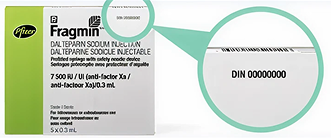
AMOXICILLIN 500MG
Take 1 capsule 3 times daily
DIN: 02469871
✓ Look for "DIN:" followed by 8 digits
Don't scan the Rx# (varies)
Example: Prescription Number
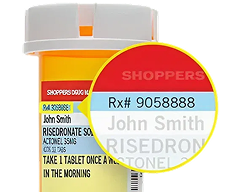
LISINOPRIL 10MG
Take 1 tablet once daily
Rx#: RX1234567
DIN: 02231234
✗ The Rx# is your prescription number, not the drug identifier
Quick Tips:
- •DIN is always 8 digits (no letters)
- •May be labeled "DIN" or appear unlabeled
- •Rx# often contains letters or is longer than 8 digits
- •The DIN identifies the drug, not your prescription
Frequently Asked Questions
Important information about privacy, security, and using this tool safely
The Drug Identification Number (DIN) is an 8-digit number that identifies the specific medication product. It's unique to the drug, strength, and form. The Prescription Number (Rx#) is your pharmacy's internal tracking number for your specific prescription and is different for every prescription you fill. To use this app, you need to scan the DIN, not the Rx#.
Your privacy is our top priority. Our OCR technology ONLY extracts the 8-digit Drug Identification Number (DIN) from your prescription label. We do not capture, store, or transmit any patient identifying information such as your name, address, prescription number, doctor information, or any other personal details. The scanning happens entirely on your device, and only the DIN is used to retrieve educational content from Health Canada's public database.
The images captured by your camera are processed locally on your device and are NOT saved, stored, or transmitted to any server. Once the DIN is extracted, the image is immediately discarded. We do not retain any photographic data from your prescription labels.
No. This product is designed for EDUCATIONAL PURPOSES ONLY and is not intended to be a substitute for professional medical advice, diagnosis, or treatment. Always seek the advice of your physician, pharmacist, or other qualified healthcare provider with any questions you may have regarding your medications or medical conditions. Never disregard professional medical advice or delay seeking it because of information provided by this application.
All medication information is validated against Health Canada's official Drug Product Database (DPD), which contains comprehensive information about drugs approved for use in Canada. When you scan a DIN, we query this public government database to ensure you receive accurate, up-to-date information about the medication.
If the automatic scanner has difficulty reading your label, you can use the Manual Entry option to type in the 8-digit DIN directly. Make sure you're scanning in good lighting and that the DIN is clearly visible and in focus. The DIN is always an 8-digit number with no letters.
Important Liability Notice
This application is provided "as is" for educational purposes only. While we strive to provide accurate information from Health Canada's database, we make no warranties or representations regarding the accuracy, completeness, or reliability of the information. You assume full responsibility for how you use this information. This tool does not replace professional healthcare advice, and you should always consult with qualified healthcare providers regarding your medications and health conditions.